1、接入指南
1.1、概要
本接口文档是为开发者提供一个快速接入联空医问平台的接口文档
1.2、修改历史
2018-05-15
添加接口3.8、同步用户信息
1.3、医问流程
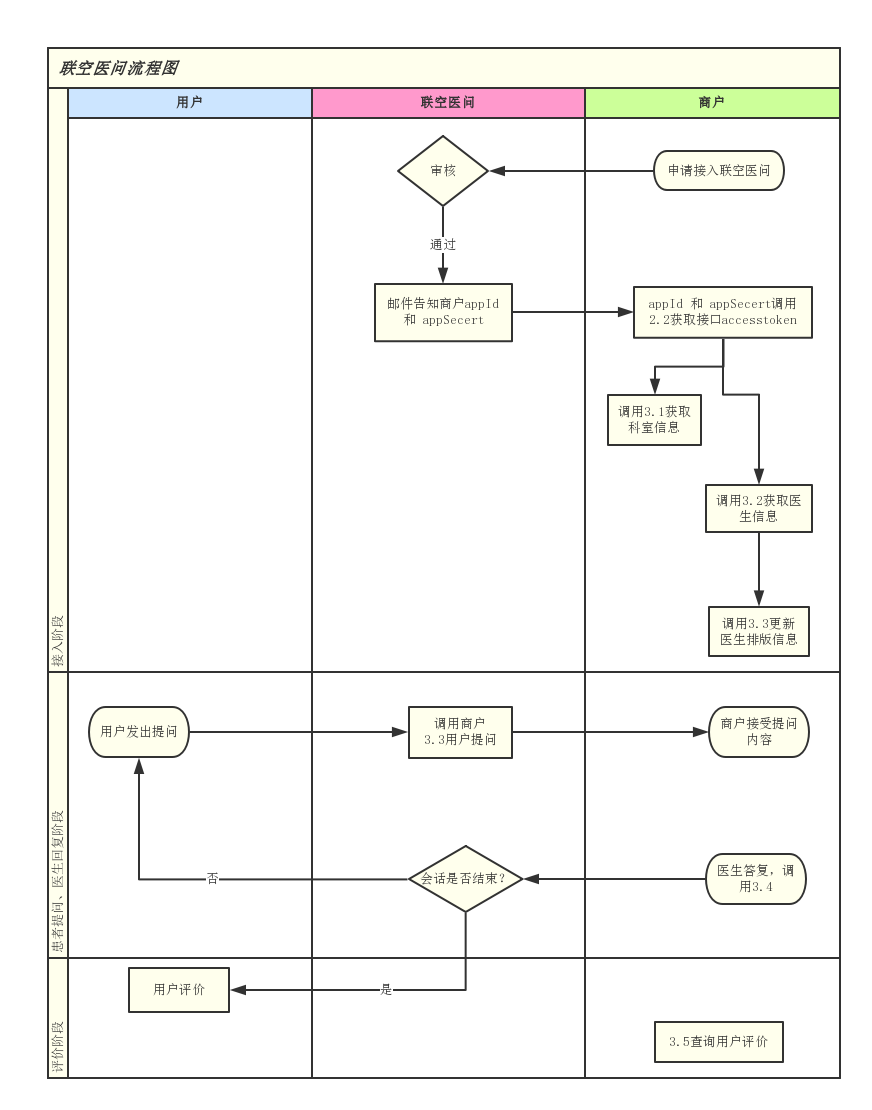
2、开始开发
2.1、创建appId和appSecert
请发送邮件到 email: yaping.x@linkingcloud.cn
邮件标题:申请联空医问appid
邮件需写明机构名称及联系方式。
审核通过后会回复邮件告知 appId 和 appSecert
2.2、获取调用接口的access_token
地址 https://lcqaapi.linkingcloud.cn/oauth/token
请使用http post 方式提交字符串 grant_type=client_credentials&client_id=appid&client_secret=appsecert
appid 和 appsecert 请参考接口文档2.1发送邮件后获取
返回参数 json 格式 如下
正常返回
{
"access_token": "6XmZ5RH8hGdO-_2AcCI8FSHzAKKKpi2UvuAqLHB1OTE-3xE0txQSCQ9PP3v04yer-MyV2P7wbLwhl_3JZvnO7KR3kobQYm5zLBypuwJauZ5vlf2tJ3MPZgxzLMzOBC0gVQ4frxpsfLlckXanVTpvg1KhDObuPnNoKUJ7EOyKWYXbu0zFGqtJYbWg-hyCzRAzQp8SMPBLSN6aFOUXQYVQig",
"token_type": "bearer",
"expires_in": 43199,
"refresh_token": "-ymDioSjNeZtEOg9jmNvJStN5nHHfpT3gw6VkHQpnyquIkjtEWxKdcuuIVtZAkqK4Cl4DAbGodFbNOfeERs06drBoGaJrSQ_YwWz-qutm-X_MJIqWrISXUwlEOVv9AvldYKNBf6QCPDERoDwqY_8wLO7rJSd_Krt0-woTXeJLjv2Z2Cwgnj-S0pM4qYq_TR-wziXoTcNBSpSvHvx_owiXQ",
"app_id": "appid",
".issued": "Mon, 19 Sep 2016 17:03:06 GMT",
".expires": "Tue, 20 Sep 2016 05:03:06 GMT"
}
"access_token": "6XmZ5RH8hGdO-_2AcCI8FSHzAKKKpi2UvuAqLHB1OTE-3xE0txQSCQ9PP3v04yer-MyV2P7wbLwhl_3JZvnO7KR3kobQYm5zLBypuwJauZ5vlf2tJ3MPZgxzLMzOBC0gVQ4frxpsfLlckXanVTpvg1KhDObuPnNoKUJ7EOyKWYXbu0zFGqtJYbWg-hyCzRAzQp8SMPBLSN6aFOUXQYVQig",
"token_type": "bearer",
"expires_in": 43199,
"refresh_token": "-ymDioSjNeZtEOg9jmNvJStN5nHHfpT3gw6VkHQpnyquIkjtEWxKdcuuIVtZAkqK4Cl4DAbGodFbNOfeERs06drBoGaJrSQ_YwWz-qutm-X_MJIqWrISXUwlEOVv9AvldYKNBf6QCPDERoDwqY_8wLO7rJSd_Krt0-woTXeJLjv2Z2Cwgnj-S0pM4qYq_TR-wziXoTcNBSpSvHvx_owiXQ",
"app_id": "appid",
".issued": "Mon, 19 Sep 2016 17:03:06 GMT",
".expires": "Tue, 20 Sep 2016 05:03:06 GMT"
}
错误返回
{
"error": "invalid_clientSecret",
"error_description": "AppID 或者 AppSecret 不正确"
}
"error": "invalid_clientSecret",
"error_description": "AppID 或者 AppSecret 不正确"
}
access_token 有效期为12小时
2.3、sign使用说明
接口中用到的sign,是对输入参数的签名。签名规则:
1、获取输入参数中除sign之外的所有字段。
2、排除值为空的字段。
3、对所有字段根据字段名顺序排序。
4、按照 key1=value1&key2=value2&key3=value3 的格式进行拼接。
5、对拼接后的字符串用 2.1、创建appId和appSecert 中的appSecert进行MD5加密
2.4、如何调用接口
联空医问接口采用http post方式 数据入参为json对象
采用http post 方式提交json对象到地址 https://lcqaapi.linkingcloud.cn/
各接口中access_token的值请参考 2.2接口文档中json返回的access_token 字段的值
请注意 httpRequest 的 mediaType 一定要指定为 application/json
c# 源代码 请点击下载
3、接口列表
3.1、获取科室列表
| 名称 | 说明 | 是否必须 | 备注 | 枚举值 |
|---|---|---|---|---|
| access_token | 调用服务的临时授权 | Y | ||
| method | 方法名 | Y |
传入Json样例参考
{
    "access_token": "调用服务的临时授权",
    "method": "lc.ask.get.deptList"
}
代码调用示例
//需引用jquery
$.post("https://lcqaapi.linkingcloud.cn/api/gateway",{
    "access_token": "调用服务的临时授权",
    "method": "lc.ask.get.deptList"
},function(data){
        console.log(data)
})
//请选vs nuget 包添加引用 Microsoft.AspNet.WebApi.Client
HttpClient client = new HttpClient();
client.BaseAddress = new Uri("https://lcqaapi.linkingcloud.cn");
var responseJson = client.PostAsync("/api/gateway",new StringContent("{    'access_token': '调用服务的临时授权',    'method': 'lc.ask.get.deptList'} " ,Encoding.UTF8,"application/json") ).Result.Content.ReadAsStringAsync().Result;
Console.WriteLine(responseJson);
请参考 c# 示例代码
| 暂无出参 |
传出Json样例参考
{
    "reponse_result": {
        "code": "编号",
        "message": "消息"
    },
    "dept_list": [
        {
            "dept_id": "科室唯一标识",
            "dept_name": "科室名称"
        },
        {
            "dept_id": "科室唯一标识",
            "dept_name": "科室名称"
        }
    ]
}
3.2、获取医生列表
| 名称 | 说明 | 是否必须 | 备注 | 枚举值 |
|---|---|---|---|---|
| access_token | 调用服务的临时授权 | Y | ||
| method | 方法名 | Y |
传入Json样例参考
{
    "access_token": "调用服务的临时授权",
    "method": "lc.ask.get.doctorList"
}
代码调用示例
//需引用jquery
$.post("https://lcqaapi.linkingcloud.cn/api/gateway",{
    "access_token": "调用服务的临时授权",
    "method": "lc.ask.get.doctorList"
},function(data){
        console.log(data)
})
//请选vs nuget 包添加引用 Microsoft.AspNet.WebApi.Client
HttpClient client = new HttpClient();
client.BaseAddress = new Uri("https://lcqaapi.linkingcloud.cn");
var responseJson = client.PostAsync("/api/gateway",new StringContent("{    'access_token': '调用服务的临时授权',    'method': 'lc.ask.get.doctorList'} " ,Encoding.UTF8,"application/json") ).Result.Content.ReadAsStringAsync().Result;
Console.WriteLine(responseJson);
请参考 c# 示例代码
| 暂无出参 |
传出Json样例参考
{
    "reponse_result": {
        "code": "编号",
        "message": "消息"
    },
    "doctor_list": [
        {
            "doctor_id": "医生唯一标识",
            "doctor_name": "医生姓名",
            "doctor_idcardno": "医生身份证号码",
            "doctor_introduction": "医生擅长标签",
            "doctor_introduction_academic": "医生专业经历",
            "doctor_introduction_edu": "医生背景介绍",
            "doctor_introduction_skill": "医生擅长领域",
            "doctor_sort": "医生排序",
            "doctor_title": "医生职称",
            "doctor_service_list": "医生服务列表",
            "dept_name": "科室名称"
        },
        {
            "doctor_id": "医生唯一标识",
            "doctor_name": "医生姓名",
            "doctor_idcardno": "医生身份证号码",
            "doctor_introduction": "医生擅长标签",
            "doctor_introduction_academic": "医生专业经历",
            "doctor_introduction_edu": "医生背景介绍",
            "doctor_introduction_skill": "医生擅长领域",
            "doctor_sort": "医生排序",
            "doctor_title": "医生职称",
            "doctor_service_list": "医生服务列表",
            "dept_name": "科室名称"
        }
    ]
}
3.3、用户对话
| 名称 | 说明 | 是否必须 | 备注 | 枚举值 |
|---|---|---|---|---|
| app_id | 商户唯一标识 | Y | ||
| method | 方法名 | Y | ||
| order_id | 订单唯一流水号 | Y | ||
| openid | 用户唯一标识 | Y | ||
| patient_nickname | 昵称、姓名 | N | ||
| patient_avatar | 头像 | N | ||
| patient_birthdate | 出生日期 | N | 格式(yyyy-MM-dd) | |
| patient_sex | 性别 | N | ||
| patient_tel | 手机号 | N | ||
| ask_content | 提问内容 | Y | ||
| ask_imagelist | 提问图片列表 | N | ||
| ask_createtime | 提问创建时间 | N | ||
| appointment_date | 预约日期 | N | 格式(yyyy-MM-dd) | |
| appointment_time | 预约时间 | N | 格式(hh:mm-hh:mm) | |
| dept_id | 科室唯一标识 | N | ||
| doctor_id | 医生唯一标识 | Y | ||
| consult_name | 咨询类型名称 | Y | ||
| consult_amount | 咨询金额 | Y | ||
| sign | 签名 | Y | 签名 |
传入Json样例参考
{
    "app_id": "商户唯一标识",
    "method": "lc.ask.send.user",
    "order_id": "订单唯一流水号",
    "openid": "用户唯一标识",
    "patient_nickname": "昵称、姓名",
    "patient_avatar": "头像",
    "patient_birthdate": "出生日期",
    "patient_sex": "性别",
    "patient_tel": "手机号",
    "ask_content": "提问内容",
    "ask_imagelist": "提问图片列表",
    "ask_createtime": "提问创建时间",
    "appointment_date": "预约日期",
    "appointment_time": "预约时间",
    "dept_id": "科室唯一标识",
    "doctor_id": "医生唯一标识",
    "consult_name": "咨询类型名称",
    "consult_amount": "咨询金额",
    "sign": "签名"
}
代码调用示例
//需引用jquery
$.post("https://lcqaapi.linkingcloud.cn/api/gateway",{
    "app_id": "商户唯一标识",
    "method": "lc.ask.send.user",
    "order_id": "订单唯一流水号",
    "openid": "用户唯一标识",
    "patient_nickname": "昵称、姓名",
    "patient_avatar": "头像",
    "patient_birthdate": "出生日期",
    "patient_sex": "性别",
    "patient_tel": "手机号",
    "ask_content": "提问内容",
    "ask_imagelist": "提问图片列表",
    "ask_createtime": "提问创建时间",
    "appointment_date": "预约日期",
    "appointment_time": "预约时间",
    "dept_id": "科室唯一标识",
    "doctor_id": "医生唯一标识",
    "consult_name": "咨询类型名称",
    "consult_amount": "咨询金额",
    "sign": "签名"
},function(data){
        console.log(data)
})
//请选vs nuget 包添加引用 Microsoft.AspNet.WebApi.Client
HttpClient client = new HttpClient();
client.BaseAddress = new Uri("https://lcqaapi.linkingcloud.cn");
var responseJson = client.PostAsync("/api/gateway",new StringContent("{    'app_id': '商户唯一标识',    'method': 'lc.ask.send.user',    'order_id': '订单唯一流水号',    'openid': '用户唯一标识',    'patient_nickname': '昵称、姓名',    'patient_avatar': '头像',    'patient_birthdate': '出生日期',    'patient_sex': '性别',    'patient_tel': '手机号',    'ask_content': '提问内容',    'ask_imagelist': '提问图片列表',    'ask_createtime': '提问创建时间',    'appointment_date': '预约日期',    'appointment_time': '预约时间',    'dept_id': '科室唯一标识',    'doctor_id': '医生唯一标识',    'consult_name': '咨询类型名称',    'consult_amount': '咨询金额',    'sign': '签名'} " ,Encoding.UTF8,"application/json") ).Result.Content.ReadAsStringAsync().Result;
Console.WriteLine(responseJson);
请参考 c# 示例代码
| 暂无出参 |
传出Json样例参考
{
    "reponse_result": {
        "code": "编号",
        "message": "消息"
    }
}
3.4、医生回复信息
| 名称 | 说明 | 是否必须 | 备注 | 枚举值 |
|---|---|---|---|---|
| access_token | 调用服务的临时授权 | Y | ||
| method | 方法名 | Y | ||
| order_id | 订单唯一流水号 | Y | ||
| reply_content | 回复内容 | Y | message_type为[0]时传文本内容,message_type为[1]时传图片的base64编码字符串 | |
| reply_time | 回复时间 | N | ||
| ask_status | 提问状态 | Y | [1]已回复 [3]已结束 | |
| message_type | 消息类型 | Y | [0]文本 [1]图片 |
传入Json样例参考
{
    "access_token": "调用服务的临时授权",
    "method": "lc.ask.reply.doctor",
    "order_id": "订单唯一流水号",
    "reply_content": "回复内容",
    "reply_time": "回复时间",
    "ask_status": "提问状态",
    "message_type": "消息类型"
}
代码调用示例
//需引用jquery
$.post("https://lcqaapi.linkingcloud.cn/api/gateway",{
    "access_token": "调用服务的临时授权",
    "method": "lc.ask.reply.doctor",
    "order_id": "订单唯一流水号",
    "reply_content": "回复内容",
    "reply_time": "回复时间",
    "ask_status": "提问状态",
    "message_type": "消息类型"
},function(data){
        console.log(data)
})
//请选vs nuget 包添加引用 Microsoft.AspNet.WebApi.Client
HttpClient client = new HttpClient();
client.BaseAddress = new Uri("https://lcqaapi.linkingcloud.cn");
var responseJson = client.PostAsync("/api/gateway",new StringContent("{    'access_token': '调用服务的临时授权',    'method': 'lc.ask.reply.doctor',    'order_id': '订单唯一流水号',    'reply_content': '回复内容',    'reply_time': '回复时间',    'ask_status': '提问状态',    'message_type': '消息类型'} " ,Encoding.UTF8,"application/json") ).Result.Content.ReadAsStringAsync().Result;
Console.WriteLine(responseJson);
请参考 c# 示例代码
| 暂无出参 |
传出Json样例参考
{
    "reponse_result": {
        "code": "编号",
        "message": "消息"
    }
}
3.5、用户评价查询
| 名称 | 说明 | 是否必须 | 备注 | 枚举值 |
|---|---|---|---|---|
| access_token | 调用服务的临时授权 | Y | ||
| method | 方法名 | Y | ||
| order_id | 订单唯一流水号 | Y | ||
| openid | 用户唯一标识 | Y |
传入Json样例参考
{
    "access_token": "调用服务的临时授权",
    "method": "lc.ask.get.evaluate",
    "order_id": "订单唯一流水号",
    "openid": "用户唯一标识"
}
代码调用示例
//需引用jquery
$.post("https://lcqaapi.linkingcloud.cn/api/gateway",{
    "access_token": "调用服务的临时授权",
    "method": "lc.ask.get.evaluate",
    "order_id": "订单唯一流水号",
    "openid": "用户唯一标识"
},function(data){
        console.log(data)
})
//请选vs nuget 包添加引用 Microsoft.AspNet.WebApi.Client
HttpClient client = new HttpClient();
client.BaseAddress = new Uri("https://lcqaapi.linkingcloud.cn");
var responseJson = client.PostAsync("/api/gateway",new StringContent("{    'access_token': '调用服务的临时授权',    'method': 'lc.ask.get.evaluate',    'order_id': '订单唯一流水号',    'openid': '用户唯一标识'} " ,Encoding.UTF8,"application/json") ).Result.Content.ReadAsStringAsync().Result;
Console.WriteLine(responseJson);
请参考 c# 示例代码
| 暂无出参 |
传出Json样例参考
{
    "reponse_result": {
        "code": "编号",
        "message": "消息"
    },
    "evaluate_info": {
        "evaluate_content": "评价内容",
        "evaluate_score": "评价分数",
        "evaluate_time": "评价时间"
    }
}
3.6、更新医生排班信息
| 名称 | 说明 | 是否必须 | 备注 | 枚举值 |
|---|---|---|---|---|
| access_token | 调用服务的临时授权 | Y | ||
| method | 方法名 | Y | ||
| doctor_id | 医生唯一标识 | Y | ||
| service_id | 服务唯一标识 | Y | ||
| is_full_day | 是否全天 | Y | 是:1,否:0 |
传入Json样例参考
{
    "access_token": "调用服务的临时授权",
    "method": "lc.ask.update.scheduling",
    "doctor_id": "医生唯一标识",
    "service_id": "服务唯一标识",
    "is_full_day": "是否全天",
    "monday_list": [
        {
            "begintime": "开始时间",
            "endtime": "结束时间"
        },
        {
            "begintime": "开始时间",
            "endtime": "结束时间"
        }
    ],
    "tuesday_list": [
        {
            "begintime": "开始时间",
            "endtime": "结束时间"
        },
        {
            "begintime": "开始时间",
            "endtime": "结束时间"
        }
    ],
    "wednesday_list": [
        {
            "begintime": "开始时间",
            "endtime": "结束时间"
        },
        {
            "begintime": "开始时间",
            "endtime": "结束时间"
        }
    ],
    "thursday_list": [
        {
            "begintime": "开始时间",
            "endtime": "结束时间"
        },
        {
            "begintime": "开始时间",
            "endtime": "结束时间"
        }
    ],
    "friday_list": [
        {
            "begintime": "开始时间",
            "endtime": "结束时间"
        },
        {
            "begintime": "开始时间",
            "endtime": "结束时间"
        }
    ],
    "saturday_list": [
        {
            "begintime": "开始时间",
            "endtime": "结束时间"
        },
        {
            "begintime": "开始时间",
            "endtime": "结束时间"
        }
    ],
    "sunday_list": [
        {
            "begintime": "开始时间",
            "endtime": "结束时间"
        },
        {
            "begintime": "开始时间",
            "endtime": "结束时间"
        }
    ]
}
代码调用示例
//需引用jquery
$.post("https://lcqaapi.linkingcloud.cn/api/gateway",{
    "access_token": "调用服务的临时授权",
    "method": "lc.ask.update.scheduling",
    "doctor_id": "医生唯一标识",
    "service_id": "服务唯一标识",
    "is_full_day": "是否全天",
    "monday_list": [
        {
            "begintime": "开始时间",
            "endtime": "结束时间"
        },
        {
            "begintime": "开始时间",
            "endtime": "结束时间"
        }
    ],
    "tuesday_list": [
        {
            "begintime": "开始时间",
            "endtime": "结束时间"
        },
        {
            "begintime": "开始时间",
            "endtime": "结束时间"
        }
    ],
    "wednesday_list": [
        {
            "begintime": "开始时间",
            "endtime": "结束时间"
        },
        {
            "begintime": "开始时间",
            "endtime": "结束时间"
        }
    ],
    "thursday_list": [
        {
            "begintime": "开始时间",
            "endtime": "结束时间"
        },
        {
            "begintime": "开始时间",
            "endtime": "结束时间"
        }
    ],
    "friday_list": [
        {
            "begintime": "开始时间",
            "endtime": "结束时间"
        },
        {
            "begintime": "开始时间",
            "endtime": "结束时间"
        }
    ],
    "saturday_list": [
        {
            "begintime": "开始时间",
            "endtime": "结束时间"
        },
        {
            "begintime": "开始时间",
            "endtime": "结束时间"
        }
    ],
    "sunday_list": [
        {
            "begintime": "开始时间",
            "endtime": "结束时间"
        },
        {
            "begintime": "开始时间",
            "endtime": "结束时间"
        }
    ]
},function(data){
        console.log(data)
})
//请选vs nuget 包添加引用 Microsoft.AspNet.WebApi.Client
HttpClient client = new HttpClient();
client.BaseAddress = new Uri("https://lcqaapi.linkingcloud.cn");
var responseJson = client.PostAsync("/api/gateway",new StringContent("{    'access_token': '调用服务的临时授权',    'method': 'lc.ask.update.scheduling',    'doctor_id': '医生唯一标识',    'service_id': '服务唯一标识',    'is_full_day': '是否全天',    'monday_list': [        {            'begintime': '开始时间',            'endtime': '结束时间'        },        {            'begintime': '开始时间',            'endtime': '结束时间'        }    ],    'tuesday_list': [        {            'begintime': '开始时间',            'endtime': '结束时间'        },        {            'begintime': '开始时间',            'endtime': '结束时间'        }    ],    'wednesday_list': [        {            'begintime': '开始时间',            'endtime': '结束时间'        },        {            'begintime': '开始时间',            'endtime': '结束时间'        }    ],    'thursday_list': [        {            'begintime': '开始时间',            'endtime': '结束时间'        },        {            'begintime': '开始时间',            'endtime': '结束时间'        }    ],    'friday_list': [        {            'begintime': '开始时间',            'endtime': '结束时间'        },        {            'begintime': '开始时间',            'endtime': '结束时间'        }    ],    'saturday_list': [        {            'begintime': '开始时间',            'endtime': '结束时间'        },        {            'begintime': '开始时间',            'endtime': '结束时间'        }    ],    'sunday_list': [        {            'begintime': '开始时间',            'endtime': '结束时间'        },        {            'begintime': '开始时间',            'endtime': '结束时间'        }    ]} " ,Encoding.UTF8,"application/json") ).Result.Content.ReadAsStringAsync().Result;
Console.WriteLine(responseJson);
请参考 c# 示例代码
| 暂无出参 |
传出Json样例参考
{
    "reponse_result": {
        "code": "编号",
        "message": "消息"
    }
}
3.7、获取用户提问记录
| 名称 | 说明 | 是否必须 | 备注 | 枚举值 |
|---|---|---|---|---|
| access_token | 调用服务的临时授权 | Y | ||
| method | 方法名 | Y | ||
| openid | 用户唯一标识 | N | ||
| begintime | 开始时间 | Y | 格式(hh:mm) | |
| endtime | 结束时间 | Y | 格式(hh:mm) |
传入Json样例参考
{
    "access_token": "调用服务的临时授权",
    "method": "lc.ask.get.asklist",
    "openid": "用户唯一标识",
    "begintime": "开始时间",
    "endtime": "结束时间"
}
代码调用示例
//需引用jquery
$.post("https://lcqaapi.linkingcloud.cn/api/gateway",{
    "access_token": "调用服务的临时授权",
    "method": "lc.ask.get.asklist",
    "openid": "用户唯一标识",
    "begintime": "开始时间",
    "endtime": "结束时间"
},function(data){
        console.log(data)
})
//请选vs nuget 包添加引用 Microsoft.AspNet.WebApi.Client
HttpClient client = new HttpClient();
client.BaseAddress = new Uri("https://lcqaapi.linkingcloud.cn");
var responseJson = client.PostAsync("/api/gateway",new StringContent("{    'access_token': '调用服务的临时授权',    'method': 'lc.ask.get.asklist',    'openid': '用户唯一标识',    'begintime': '开始时间',    'endtime': '结束时间'} " ,Encoding.UTF8,"application/json") ).Result.Content.ReadAsStringAsync().Result;
Console.WriteLine(responseJson);
请参考 c# 示例代码
| 暂无出参 |
传出Json样例参考
{
    "reponse_result": {
        "code": "编号",
        "message": "消息"
    },
    "user_ask_list": [
        {
            "order_id": "订单唯一流水号",
            "doctor_name": "医生姓名",
            "customer_name": "商户名",
            "dept_name": "科室名称",
            "ask_content": "提问内容",
            "buy_link_again": "再次购买链接",
            "detail_link": "详情链接",
            "create_time": "创建时间",
            "ask_status": "提问状态",
            "pay_status": "支付状态",
            "ask_price": "提问金额",
            "service_name": "服务名称",
            "feed_content": "评论内容",
            "isBlack": "是否为黑名单",
            "patient_name": "患者姓名"
        },
        {
            "order_id": "订单唯一流水号",
            "doctor_name": "医生姓名",
            "customer_name": "商户名",
            "dept_name": "科室名称",
            "ask_content": "提问内容",
            "buy_link_again": "再次购买链接",
            "detail_link": "详情链接",
            "create_time": "创建时间",
            "ask_status": "提问状态",
            "pay_status": "支付状态",
            "ask_price": "提问金额",
            "service_name": "服务名称",
            "feed_content": "评论内容",
            "isBlack": "是否为黑名单",
            "patient_name": "患者姓名"
        }
    ]
}
3.8、同步用户信息
| 名称 | 说明 | 是否必须 | 备注 | 枚举值 |
|---|---|---|---|---|
| access_token | 调用服务的临时授权 | Y | ||
| method | 方法名 | Y | ||
| openid | 用户唯一标识 | Y | ||
| patient_nickname | 昵称、姓名 | N | ||
| patient_avatar | 头像 | N | ||
| patient_tel | 手机号 | Y | ||
| sign | 签名 | Y | 签名 |
传入Json样例参考
{
    "access_token": "调用服务的临时授权",
    "method": "lc.ask.upload.user",
    "openid": "用户唯一标识",
    "patient_nickname": "昵称、姓名",
    "patient_avatar": "头像",
    "patient_tel": "手机号",
    "sign": "签名"
}
代码调用示例
//需引用jquery
$.post("https://lcqaapi.linkingcloud.cn/api/gateway",{
    "access_token": "调用服务的临时授权",
    "method": "lc.ask.upload.user",
    "openid": "用户唯一标识",
    "patient_nickname": "昵称、姓名",
    "patient_avatar": "头像",
    "patient_tel": "手机号",
    "sign": "签名"
},function(data){
        console.log(data)
})
//请选vs nuget 包添加引用 Microsoft.AspNet.WebApi.Client
HttpClient client = new HttpClient();
client.BaseAddress = new Uri("https://lcqaapi.linkingcloud.cn");
var responseJson = client.PostAsync("/api/gateway",new StringContent("{    'access_token': '调用服务的临时授权',    'method': 'lc.ask.upload.user',    'openid': '用户唯一标识',    'patient_nickname': '昵称、姓名',    'patient_avatar': '头像',    'patient_tel': '手机号',    'sign': '签名'} " ,Encoding.UTF8,"application/json") ).Result.Content.ReadAsStringAsync().Result;
Console.WriteLine(responseJson);
请参考 c# 示例代码
| 暂无出参 |
传出Json样例参考
{
    "reponse_result": {
        "code": "编号",
        "message": "消息"
    }
}